Google Unveils 6 New Ways to Protect Users from Scams
AI Quick Summary
- Google Messages has received significant security upgrades, including "Safer Links" to automatically block malicious URLs in suspected spam messages and "Key Verifier" to cryptographically confirm the identity of contacts in end-to-end encrypted chats via QR codes.
- New account recovery tools aim to prevent lockouts with "Recovery Contacts," allowing trusted individuals to help verify identity, and "Sign In with Mobile Number," enabling passwordless access on new Android devices using a previous device's lock-screen passcode.
- Google is actively combating scams through educational initiatives, such as the "Be Scam Ready" interactive game, which exposes users to common scam tactics to build resilience.
- The company is also expanding its efforts through partnerships with organizations like the National Cybersecurity Alliance and the Aspen Institute, and by hosting community workshops to raise fraud awareness.
- These comprehensive protections are critical in response to the rapid rise of AI-powered scam techniques, including voice cloning, deepfakes, and AI-generated phishing messages, which make traditional scam detection methods increasingly ineffective.
Since the article's publication in October 2025, many of these new scam protection features, including Safer Links, Key Verifier, Recovery Contacts, and Sign In with Mobile Number, have been actively rolling out globally to Android users.
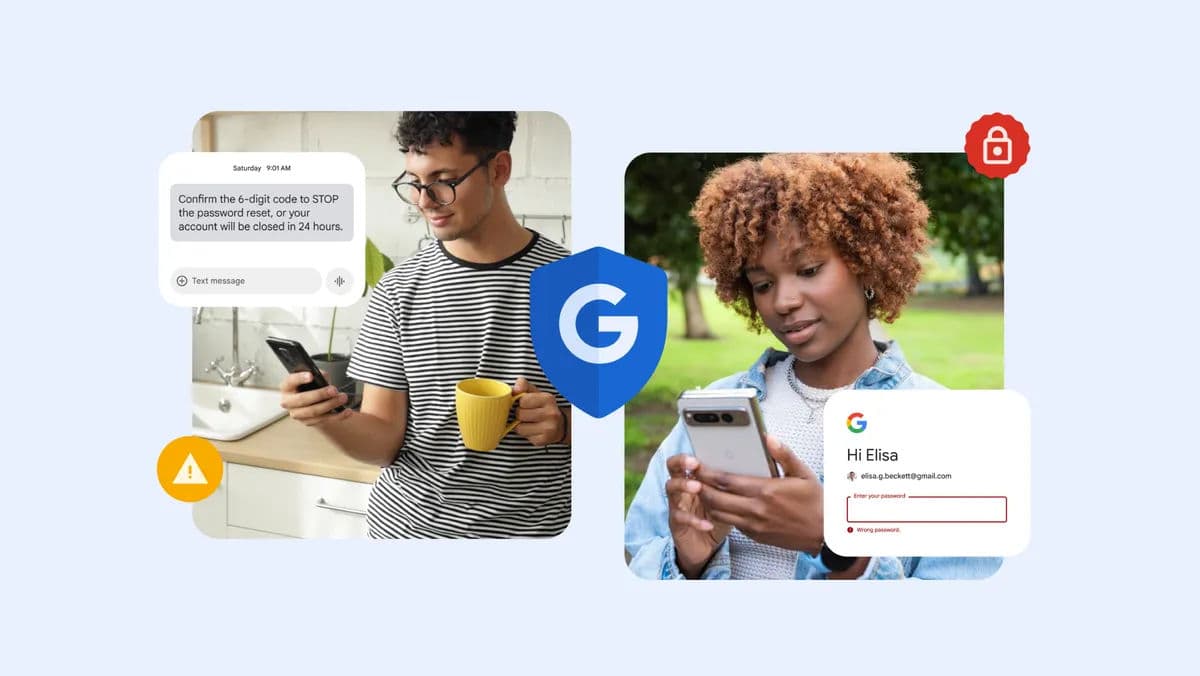
Just a few years ago, spotting a phishing email was relatively straightforward. Tell-tale signs like grammatical errors, strange formatting, or suspicious attachments made scams easy to identify. But the landscape has changed dramatically.
According to Google's official announcement, today's scammers leverage cutting-edge technologies including voice cloning, deepfakes, and sophisticated social engineering to create elaborate impersonations that are nearly indistinguishable from legitimate communications.
This technological arms race has prompted Google to innovate continuously, rolling out new security features built directly into its products. The company's latest suite of protections represents a comprehensive approach: helping users avoid scams altogether, spotting them before they cause harm, and providing recovery tools when compromises occur.
Protection #1 & #2: Google Messages Gets Major Security Upgrades
1. Safer Links: Automatic Malicious Link Blocking
Scammers frequently use text messages to distribute malicious links designed to steal personal information, passwords, or financial data. Android Authority reports that Google Messages now includes intelligent link protection that intercepts these threats before you can click them.
How Safer Links Works:
When Google Messages detects a text as potential spam using on-device machine learning, any links within that message are automatically blocked. If you attempt to click a link in a suspected spam message, you'll receive a warning: "Link blocked" with an explanation that the message has been identified as spam.
Override Option: If you believe a message was incorrectly flagged, you can mark it as "not spam," which will unblock the links. Otherwise, to access any link in a spam message, you must manually remove the conversation from the spam folder.
Global Availability: This protection is now available to all Google Messages users worldwide, according to 9to5Google.

2. Key Verifier: Confirming Contact Identity with QR Codes
One of the most sophisticated scam techniques involves impersonating trusted contacts after compromising their accounts or phone numbers. Google's answer is Key Verifier, a tool that provides cryptographic verification of contact identity.
According to Google Support documentation, Key Verifier is now available to all Android 10+ users and works with end-to-end encrypted RCS conversations in Google Messages.
How Key Verifier Works:
- Every Android device generates a unique security key
- In Google Messages, open a conversation with a trusted contact
- Tap their name at the top of the screen
- Scroll down and select "Verify keys"
- One person taps "Your QR code" while the other taps "Scan contact's QR code"
- Both scan each other's codes to establish verification
- You'll receive a "Keys verified" confirmation
Important: Keys must be re-verified if your contact gets a new device, changes SIM cards, or reinstalls the app. You'll receive a "Keys no longer verified" warning if this occurs.
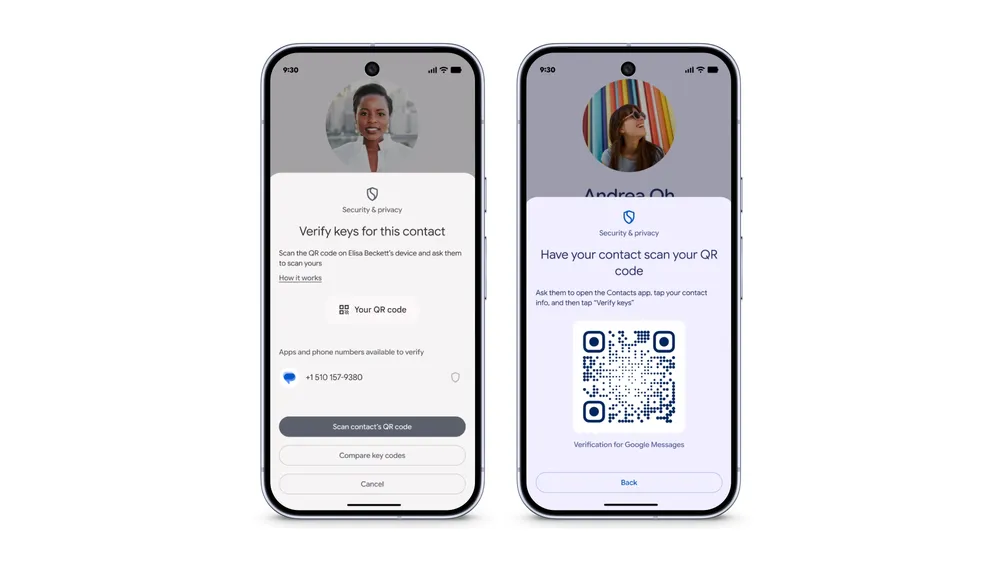
Sammy Fans notes that this feature is particularly valuable for sensitive conversations about financial information, passwords, or personal data where confirming identity is critical.
💡 When to Use Key Verifier
Use Key Verifier when:
- Discussing sensitive financial transactions
- Sharing passwords or security codes
- Receiving unexpected requests for money or information
- Confirming identity before following instructions from family members in emergency situations
Protection #3 & #4: Revolutionary Account Recovery Tools
Account lockouts create enormous stress and vulnerability. Google's Morning Consult study found that 4 in 5 consumers globally worry about losing access to their online accounts. The company is addressing this with two innovative recovery methods.
3. Recovery Contacts: Your Trusted Friends as Safety Net
Google is introducing Recovery Contacts for eligible personal Google Accounts, allowing users to designate trusted friends or family members who can help verify identity if locked out.
How Recovery Contacts Work:
Setup Process:
- Go to your Google Account Security settings
- Navigate to "Recovery Contacts" (in the newly redesigned Security section)
- Select trusted contacts from your network
- Your designated contacts receive notifications and must accept
When You Need Help:
If locked out due to forgotten password, lost passkey device, or account compromise, your Recovery Contacts can verify your identity through Google's secure system. This provides a "simple and secure way to regain access when standard recovery methods fail," according to Google's announcement.
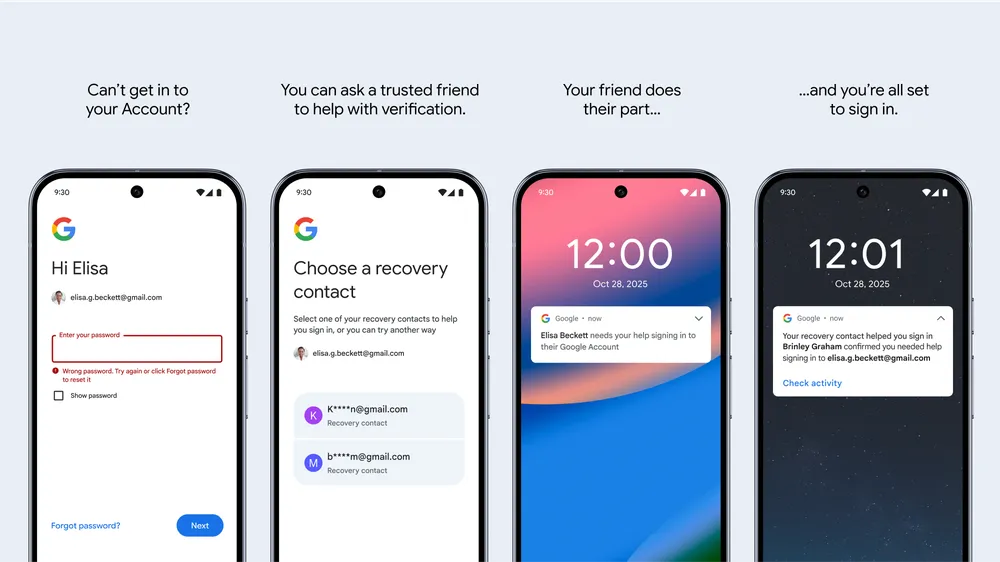
This feature layers on existing recovery methods like backup email addresses and phone numbers, creating a comprehensive safety net for account access.
4. Sign In with Mobile Number: Passwordless Recovery on New Devices
Losing or breaking your phone shouldn't mean losing access to your Google Account. Google's new "Sign in with Mobile Number" feature makes recovery on new Android devices significantly easier.
How Mobile Number Sign-In Works:
The Process:
- On your new Android device, enter your phone number
- Google automatically identifies your linked accounts
- Enter the lock-screen passcode from your previous device
- Gain access immediately—no password required
Key Benefits: You don't need to remember your Google Account password. As long as you know your previous device's lock screen pattern, PIN, or password, you can recover access. Neowin reports this feature is rolling out gradually worldwide.
Protection #5 & #6: Education and Awareness Initiatives
While technological protections are crucial, Google recognizes that education remains a fundamental defense against scams. The company is investing heavily in public awareness and scam literacy.
5. The "Be Scam Ready" Interactive Game
Based on psychological inoculation theory, Google has created an interactive game that exposes users to common scam tactics in a safe environment, building resistance to real-world fraud attempts.
About Be Scam Ready:
The Be Scam Ready game immerses users in realistic scam and fraud scenarios, teaching critical thinking skills needed to identify and avoid fraud. By experiencing common scam tactics in a controlled, educational setting, players develop pattern recognition that transfers to real-world situations.
Inoculation Theory: Just as vaccines expose your immune system to weakened pathogens, the game exposes you to scam techniques in a way that builds cognitive resistance. Research shows this approach significantly improves scam detection rates.
6. Partnerships and Community Outreach
Google's commitment to scam prevention extends beyond its products through strategic partnerships and educational initiatives targeting vulnerable populations.
Major Partnership Initiatives:
National Cybersecurity Alliance (NCA): Google is sponsoring NCA's campaign to distribute accessible cyber hygiene resources and safety product information to broad audiences across the United States.
Aspen Institute Task Force: Google joined the Aspen Institute's National Task Force on Scam and Fraud Prevention, contributing to a comprehensive report proposing America's first coordinated national strategy to combat scams and fraud.
National Elder Fraud Coordination Center (NEFCC): Google co-founded the NEFCC alongside AARP, Amazon, and Walmart. This organization's mission is reducing elder fraud through private-public coordination and creating actionable investigative packages for law enforcement.
In-Person Workshops: For Cybersecurity Awareness Month (October 2025), Google is hosting scam and fraud workshops at Google Store locations in New York City (October 21) and Mountain View (October 28).
Why These Protections Matter Now
The surge in scam sophistication directly correlates with democratized access to artificial intelligence tools. Technologies once available only to nation-states and sophisticated criminal organizations are now accessible to anyone:
- Voice Cloning: AI can replicate voices from just seconds of audio, enabling convincing impersonation of family members in "emergency" scams
- Deepfake Videos: Synthetic video generation creates fake video calls that appear authentic
- AI-Generated Text: Large language models produce grammatically perfect, contextually appropriate phishing messages that bypass traditional detection
- Social Engineering Automation: AI analyzes social media to create highly personalized scam approaches
The New Normal: AI-Enhanced Fraud
Traditional advice like "look for spelling errors" or "check the sender's email address" is increasingly obsolete. Modern scams look, sound, and feel completely legitimate. The only defense is multi-layered technological protection combined with heightened awareness and verification habits.
What You Can Do: Best Practices
Ensure you're taking advantage of Google's protections:
Protection Checklist
- Google Messages: Verify spam protection is enabled in Settings > Spam protection
- Key Verifier: Verify keys with your most important contacts (family, financial advisors, etc.)
- Recovery Contacts: Set up at least 2-3 trusted recovery contacts at myaccount.google.com
- Two-Factor Authentication: Enable 2FA on your Google Account if you haven't already
- Passkeys: Consider setting up passkeys for passwordless, phishing-resistant authentication
Final Thoughts: The Ongoing Battle
Google's six new scam protection features represent significant advancements, but the battle against fraud is perpetual. As Google implements new defenses, scammers adapt their tactics. This technological arms race shows no signs of ending.
What makes the current moment particularly challenging—and why these protections are so necessary—is the democratization of advanced technology. AI tools that can clone voices, generate convincing fake images, and write perfectly grammatical phishing messages are now accessible to anyone with an internet connection and basic technical skills.
Google's comprehensive approach won't eliminate this problem, but it will make a meaningful difference for millions of users who benefit from automatic protections, recovery tools, and education resources.
If you enjoyed this article, follow us on WhatsApp for daily tech updates. If you have an idea, need to be featured or need to partner, reach out to us at editorial@techinika.com or use our contact page.
Don't let the story end here.
Share your thoughts, ask questions, and connect with the community.

Cishahayo Songa Achille
Chief EditorCishahayo Songa Achille is a Rwandan software engineer and tech entrepreneur focused on democratizing digital skills. He is best known as the Founder and Managing Director of Techinika, an edtech firm established in 2020 to make complex technological advances accessible to the general public and build solutions for the biggest problems.
View all articles by Cishahayo Songa Achille →Up Next
AI Is Making Cyberattacks More Dangerous. Is Africa Ready?By ISHIMWE Jean Claude • 3 min read